Assign an On-demand licence to a user
A user must have an On-demand licence to start sessions with on-demand devices.
Note: Once assigned, an On-demand licence is locked for 90 days. During this time, you can't unassign it or reassign it to another user.
Assign an On-demand licence
-
Go to Account > Users in the side menu.
-
Click the Edit
 icon next to the user.
Or
Click the user in the list, select the User details tab and click Edit.
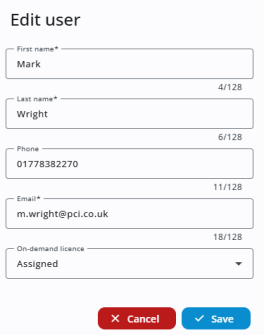
-
In the On-demand
-
Click Save.
The On-demand  icon appears in the User type column, confirming that the
See also: