Billing
This is where you'll find a summary of your 247connect licence information, including available licences, expiry date and licence history. If you have the required permissions, you can also set the default contact for your account and request deletion of your account.
-
In the 247connect Web Portal, go to Account > Billing in the side menu.
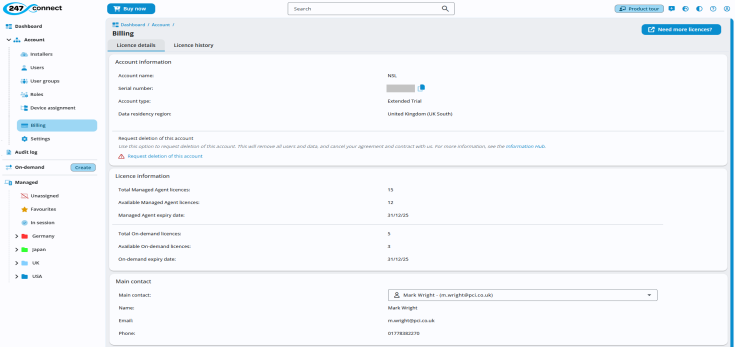
Licence details tab
This tab shows your account details,
Account information
-
Account name: This is the name of your
-
Serial number: Your unique
-
Account type: Indicates if your account is a Trial, Active or Expired account.
-
Data residency region: Indicates which of our servers you are using to store your data: EE/EEA (Germany West Central), United Kingdom (UK South) or United States (US East).
Request deletion of this account
If you want to delete your organisation's account (available only to users with billing permissions), you can request cancellation of your agreement and removal of all users and data. Click Request deletion of this account. An email is sent to 247connect to process the request.
The software components for both the Control and Agent must be removed manually or using your current software management solution.
The cancellation takes effect at the end of your current subscription period. All relevant contacts will be notified before the cancellation process starts and once it has been completed.
Any personal data held on your behalf will be removed from our production systems within 30 days, as per our Terms of Service.
If you want the cancellation process to be completed sooner or wish to withdraw your request, contact support@netsupportsoftware.com with your details.
Licence information
View the status of your Managed and On-demand
-
-
Total Managed
-
Available Managed
-
Total On-demand
-
Available On-demand
To buy more
Main contact
The main contact is the primary point of contact for your 247connect account. This person may receive important account notifications, renewal reminders and communication regarding billing.
-
Main contact: Use the drop-down list to select a user.
-
Name: Displays the full name of the selected contact.
-
Email: Shows the contact’s email address.
-
Phone: Displays the contact’s phone number.
Licence history tab
This tab shows a log of all
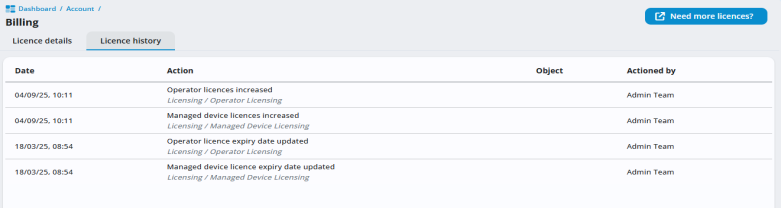
It includes updates such as
See also: