Managed Agent window
The 247connect Managed Agent window shows real-time session details and user controls during a managed session.
The Managed Agent window is available on Windows and macOS. The layout may vary slightly by platform.
The Managed Agent window opens by default when a user connects. You can disable this in the Device group settings. When disabled, the 247connect icon in the system tray (Windows) or menu bar (macOS) turns green to indicate a user is connected.
You can customise the branding that appears in the Agent window by adding your own logo. Go to Account > Settings to upload it.
Approve connection request
If user acknowledgement is enabled in Device group settings, the end user must approve the connection request before the session starts.
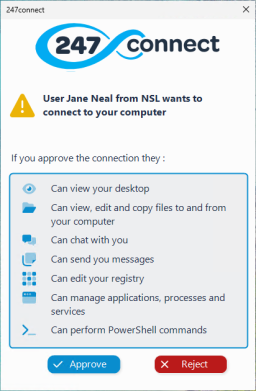
A list of available actions the user can perform when they connect is shown. This only appears for Windows Agents.
The user can't connect unless the end user approves the request.
Managed Agent during an active session
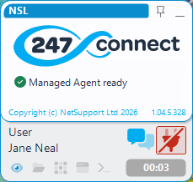
Once the session is approved and active, the window displays:
-
The name of the user running the session (this can be
-
A Chat
 icon for communicating with the user.
 -
The current remote control action(s) (Windows only).
-
A session timer showing how long the session has been active.
-
An End session
 icon to disconnect the user.
Ending the session disconnects the user and leaves the Managed Agent ready for the next connection.
See also:


